> ## Documentation Index
> Fetch the complete documentation index at: https://docs.langbot.app/llms.txt
> Use this file to discover all available pages before exploring further.
# Bots
> Connect LangBot to messaging platforms: Discord, Telegram, Slack, WeChat, QQ, Lark, DingTalk, LINE and more.
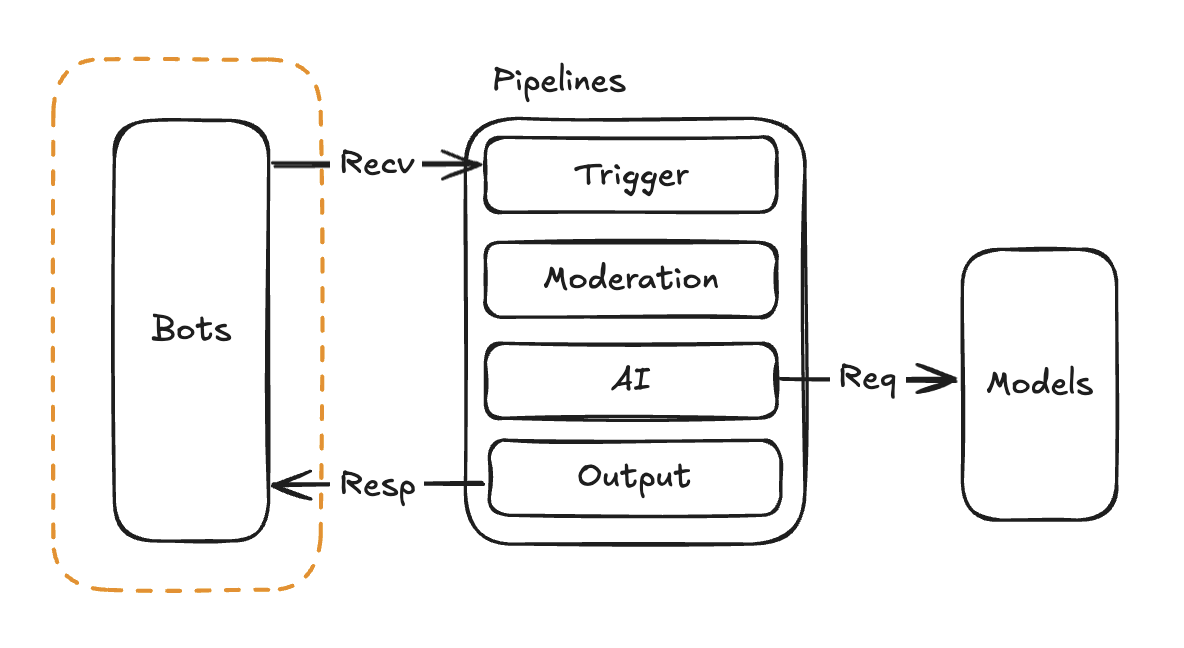
Bots are used to receive message events from messaging platforms and call pipelines to process messages.
 | Platform | Status | Notes | Tutorial |
| - | - | - | - |
| Discord | ✅ | | [Tutorial](/en/usage/platforms/discord) |
| Telegram | ✅ | | [Tutorial](/en/usage/platforms/telegram) |
| Slack | ✅ | | [Tutorial](/en/usage/platforms/slack) |
| LINE | ✅ | | [Tutorial](/en/usage/platforms/line) |
| KOOK | ✅ | | [Tutorial](/en/usage/platforms/kook) |
| Lark | ✅ | | [Tutorial](/en/usage/platforms/lark) |
| DingTalk | ✅ | | [Tutorial](/en/usage/platforms/dingtalk) |
| WeCom (Enterprise WeChat) | ✅ | Enterprise internal bot | [Tutorial](/en/usage/platforms/wecom/wecom) |
| WeCom Intelligent Bot | ✅ | wecom intelligent bot | [Tutorial](/en/usage/platforms/wecom/wecombot) |
| WeCom Customer Service | ✅ | Enterprise external bot | [Tutorial](/en/usage/platforms/wecom/wecomcs) |
| WeChat Official Account | ✅ | WeChat public platform bot | [Tutorial](/en/usage/platforms/wxoa) |
| OneBot v11 | ✅ | Uses a personal QQ account as a bot, requires an independent protocol client, supports OneBot v11 | [NapCat](/en/usage/platforms/qq/aiocqhttp/napcat)
| Platform | Status | Notes | Tutorial |
| - | - | - | - |
| Discord | ✅ | | [Tutorial](/en/usage/platforms/discord) |
| Telegram | ✅ | | [Tutorial](/en/usage/platforms/telegram) |
| Slack | ✅ | | [Tutorial](/en/usage/platforms/slack) |
| LINE | ✅ | | [Tutorial](/en/usage/platforms/line) |
| KOOK | ✅ | | [Tutorial](/en/usage/platforms/kook) |
| Lark | ✅ | | [Tutorial](/en/usage/platforms/lark) |
| DingTalk | ✅ | | [Tutorial](/en/usage/platforms/dingtalk) |
| WeCom (Enterprise WeChat) | ✅ | Enterprise internal bot | [Tutorial](/en/usage/platforms/wecom/wecom) |
| WeCom Intelligent Bot | ✅ | wecom intelligent bot | [Tutorial](/en/usage/platforms/wecom/wecombot) |
| WeCom Customer Service | ✅ | Enterprise external bot | [Tutorial](/en/usage/platforms/wecom/wecomcs) |
| WeChat Official Account | ✅ | WeChat public platform bot | [Tutorial](/en/usage/platforms/wxoa) |
| OneBot v11 | ✅ | Uses a personal QQ account as a bot, requires an independent protocol client, supports OneBot v11 | [NapCat](/en/usage/platforms/qq/aiocqhttp/napcat)
[Lagrange](/en/usage/platforms/qq/aiocqhttp/lagrange)
[LiteLoaderQQNT](/en/usage/platforms/qq/aiocqhttp/llonebot) |
| QQ Official Bot | ✅ | Connects to the QQ Open Platform bot API | [Tutorial](/en/usage/platforms/qq/official_webhook) |
**Don't want to deal with public IPs and domain setup?** Platforms like Slack, LINE, WeCom, and Lark require webhook callback URLs, meaning you need a public server, domain, and HTTPS certificate. [LangBot Cloud](https://space.langbot.app/cloud) comes with built-in domain resolution and HTTPS — sign up and start using it right away, no network configuration needed.
This documentation is built and hosted on [Mintlify](https://mintlify.com), a developer documentation platform.